01
Works in your browser"Capture the roofing call, build the job file, and generate the estimate or supplement without retyping the conversation."
Call-to-document automation
Live call to document
Loading page…

Contractorfy · AI roofing CRM
Someone asks for a document. Contractorfy creates it from your conversation, job information and relevant online research.

From the office to the jobsite
Keep the conversation, job information and documents together, with your existing ChatGPT account.
Keep the details from the conversation with the job.
Turn the request and job information into the document they need.
Check the document and use your approved delivery workflow.
Workflow results
See how roofing teams use live call capture, document automation, and governed delivery before trusting AI with customer work.
01
Works in your browser"Capture the roofing call, build the job file, and generate the estimate or supplement without retyping the conversation."
Call-to-document automation
Live call to document
02
Opt-ins respected"Estimates, supplements, work orders, and reports move into the same approved send workflow your office already trusts."
Document handoff
Generated docs stay governed
03
Revenue proof"Book the job faster: capture the request, create the estimate document, and keep the next action moving while the lead is still warm."
Roofing sales automation
Lead response stays warm
Live call assistant demo
Follow the recorded call into customer context, generated documents, office review, and customer-ready document delivery.
01
Record the customer request, transcript, suggested response, and recommended next document before the estimator loses the details.
02
Turn the caller into a customer, claim, property, roof, and next action your office can work from immediately.
03
Open the estimate, supplement, work order, material order, hail report, or lead intake sheet created from the same conversation.
Before and after Contractorfy
Replace phone notes, spreadsheets, and loose PDFs with roofing job files that include the call, context, generated document, and send-ready document.
Old way
With Contractorfy
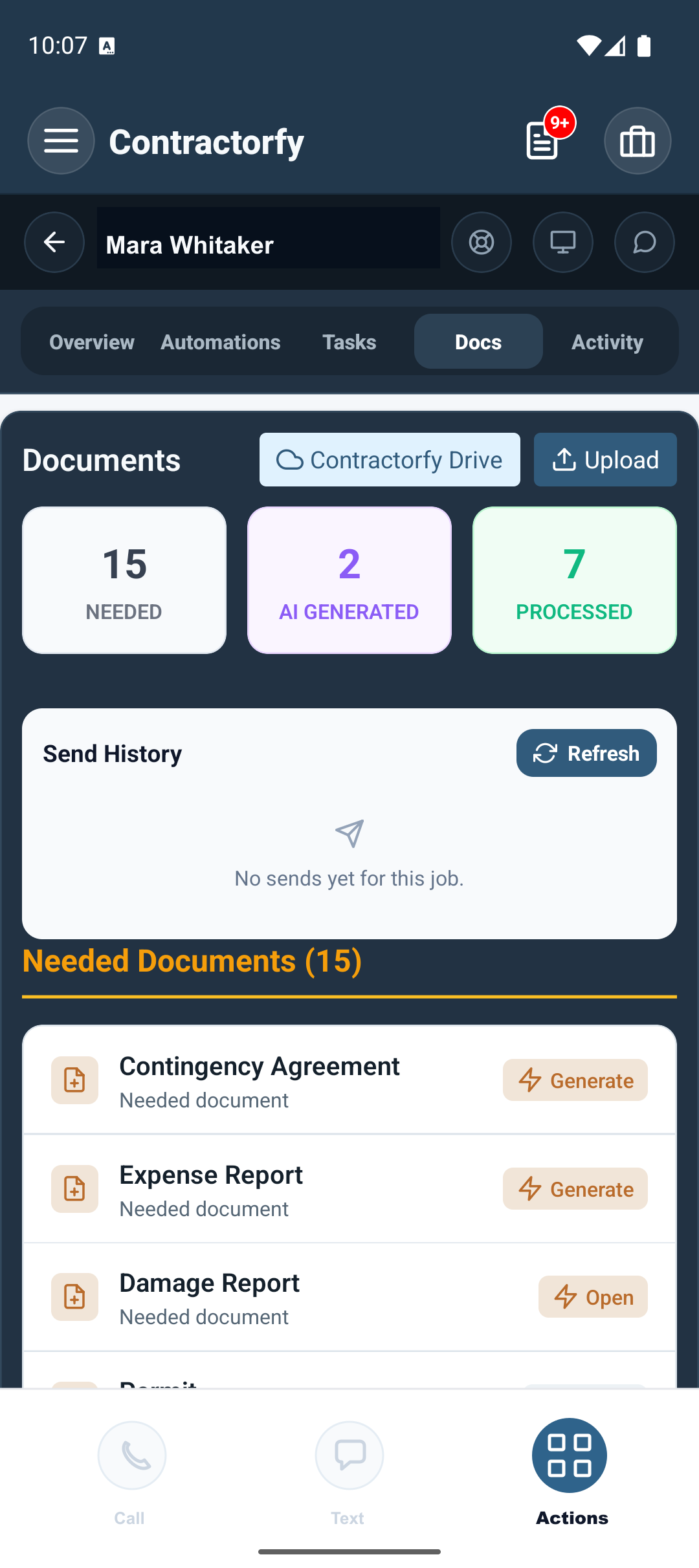
Supplement estimate ready
Call notes
Estimator remembers the request, then retypes notes into a spreadsheet or claim folder.
Recording, transcript, suggested response, and recommended document stay together on the job.
Claim context
Photos, measurements, policy notes, and carrier details live in separate tools.
Roof data, claim context, evidence, and job activity stay attached before the document is generated.
Document handoff
The office builds the PDF later, checks opt-ins manually, and chases the right contact.
Contractorfy generates the document, stages review, and routes delivery through the approved send workflow.
See Contractorfy in action

Roofing document proof
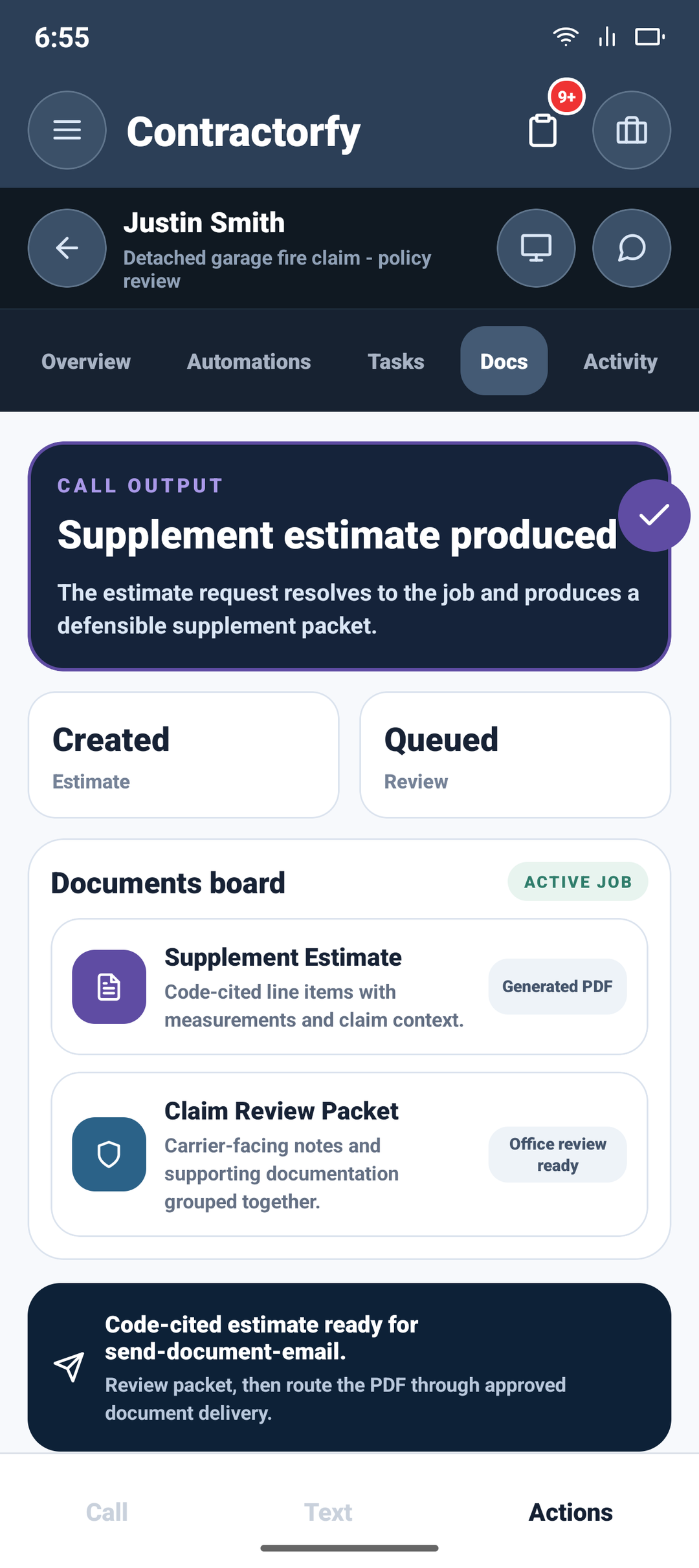
Contractorfy connects the source call, generated supplement estimate, and approved delivery path so roofing teams can quote, review, and follow up faster.
Call capture
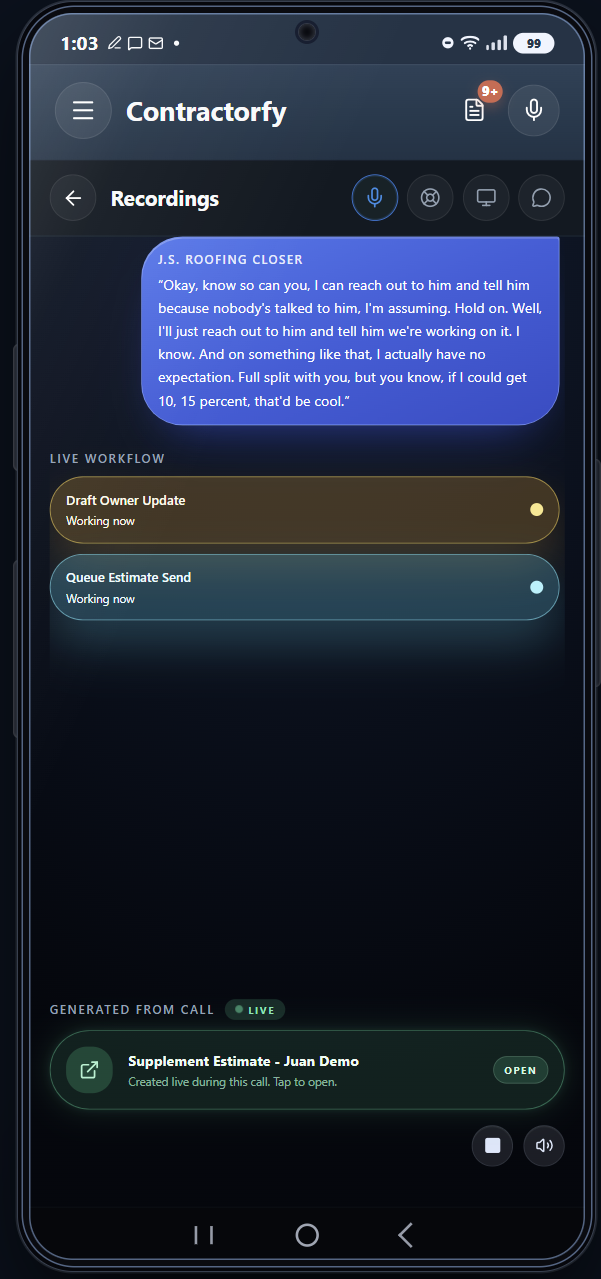
Show estimators how one roofing call becomes transcript context, suggested response language, next step, and a ready-to-review roofing document.
Supplement estimates
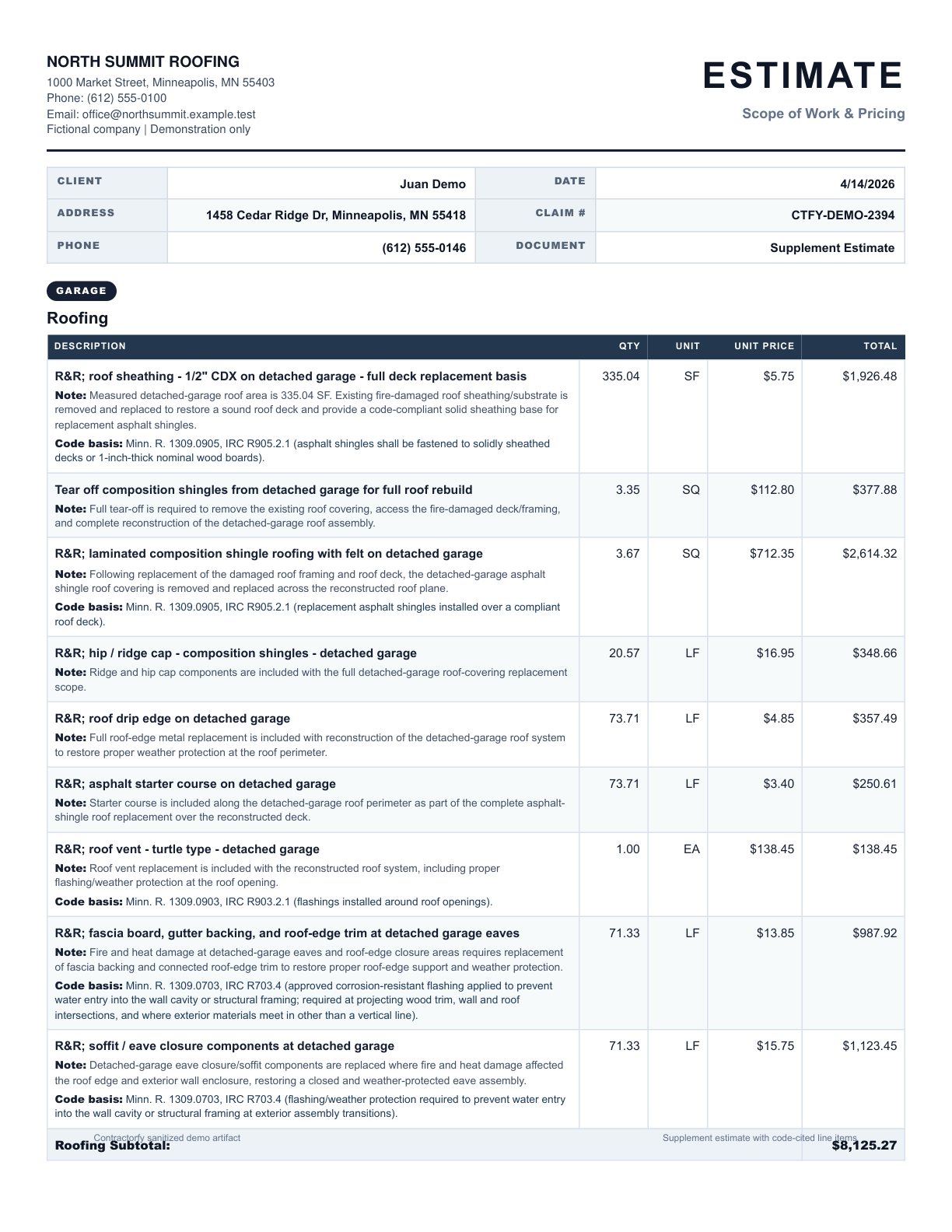
Preview the kind of supplement estimate your office can create from call details, claim context, and job notes.
Customer call
Hear the customer conversation that becomes sales guidance, job context, and roofing document automation.
Source
Recorded call, SMS, photo, or job context
Output
Estimate, supplement, material order, hail report, or lead intake sheet
Boundary
Approved send workflow keeps delivery governed
From first call to finished document
Contractorfy captures roofing intake, supplement requests, production handoffs, and field evidence so your office can quote faster, document cleaner, and send the right document with confidence.
Roofing CRM automation
Contractorfy roofing CRM gives roofers live call capture, supplement estimate automation, job documentation, storm response lead follow-up, and customer-ready document delivery in one workflow.
Live call
Capture the roofing call, guide the estimator, and start the supplement estimate before the lead cools off.
Call captured. Supplement estimate started.

Storm route
Turn hail reports, neighborhood targets, and door-knocking PDFs into the next storm sales route.
Hail report + canvassing route.
Works in your browser
Give field reps and office staff the same job record, document status, and next action.
One job record across devices.
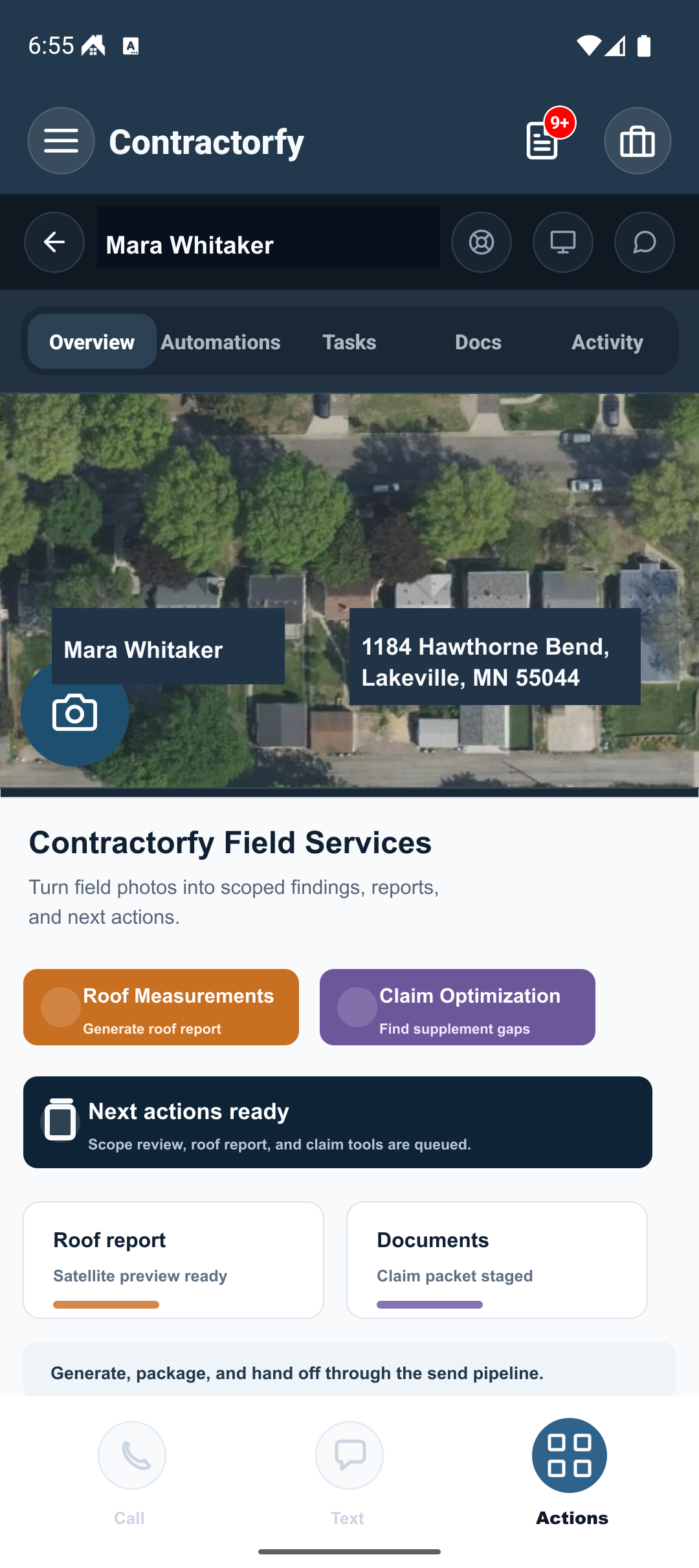

Evidence
Chalk-marked hits, test squares, and moisture readings land on the claim file the second they are shot.
Real job photo → damage report.
Roofing AI documents
Generate supplement estimates, material orders, work orders, hail reports, and lead intake sheets from real job context.
Roofing documents stay ready for office review.
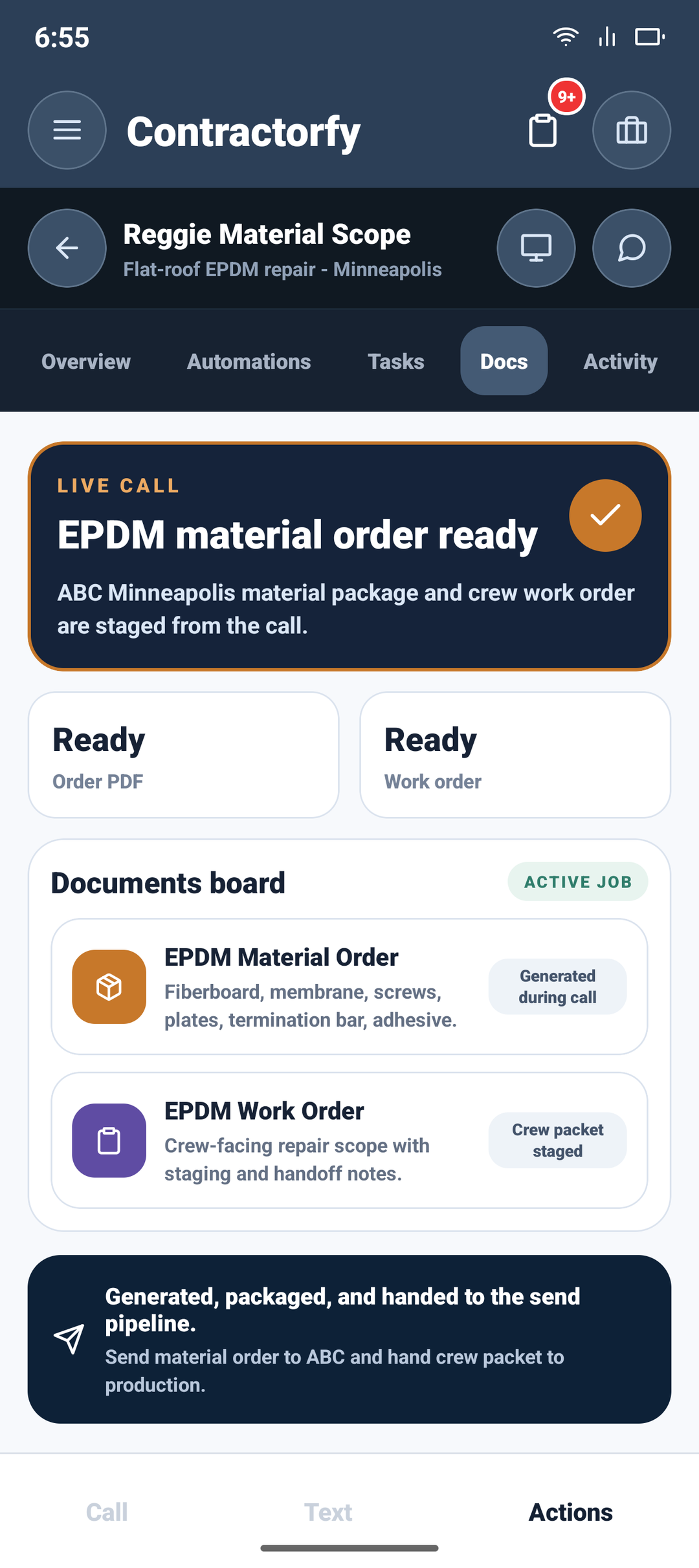
Roofing CRM platform
Roofing CRM software for intake, production, estimating, documents, and customer-ready document delivery.
Calls, jobs, docs, tasks, pricing.
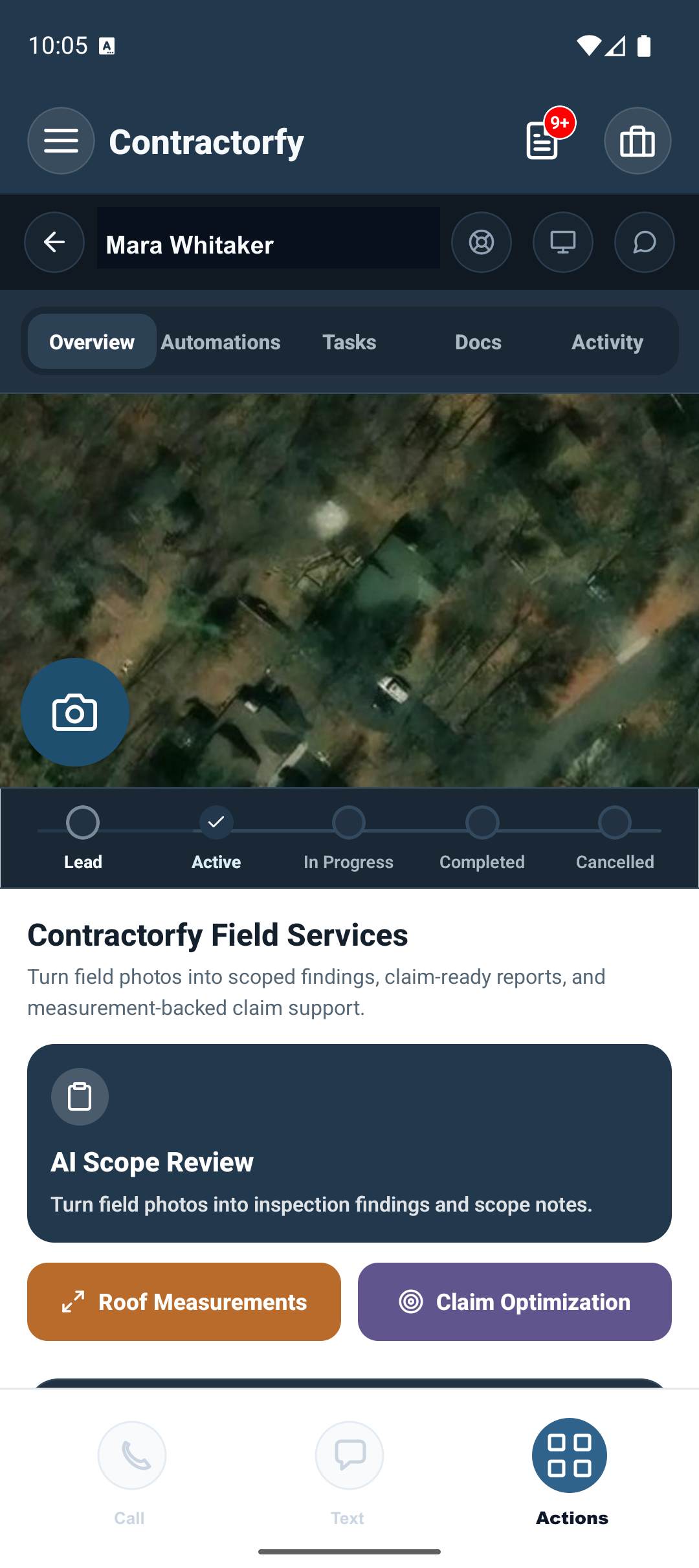
Roofing workflow automation
Supplement desk
Production desk
Sales intake
Storm route
Roofing CRM product demos
Android app (coming soon) previews: explore call capture, job photos, estimates, supplements, work orders, hail reports, and follow-up routing. Use Contractorfy on the web today.
Chapter 01 / Live call capture
1 of 5
Live call capture
Contractorfy keeps the recording, transcript, suggested response, generated estimate document, and next office action in one roofing CRM workflow.
Meet your roofing command center
Give estimators, production teams, storm crews, and office staff one roofing CRM for calls, evidence, documents, routes, approvals, and follow-up.
Roofing AI
Use call transcripts, claim context, field photos, and job history to prepare the next estimate, supplement, report, or follow-up task without starting from a blank page.
Proof point
Call, claim, job, and document context in one workflow
Field evidence
Guided photo prompts, measurements, weather context, and missing-evidence checks help crews capture the proof the office needs before the job file goes cold.
Proof point
Field photos preserve roof-damage evidence for review
Pipeline speed
A recorded call can resolve the customer request, generate the right roofing document, and move it into review while the estimator is still close to the conversation.
Proof point
Live call to estimate document
Storm-week operations
Recordings, SMS captures, storm reports, canvassing routes, and document queues stay organized when your office is juggling calls, inspections, and claim deadlines.
Proof point
Storm route, hail report, and door-knock PDF
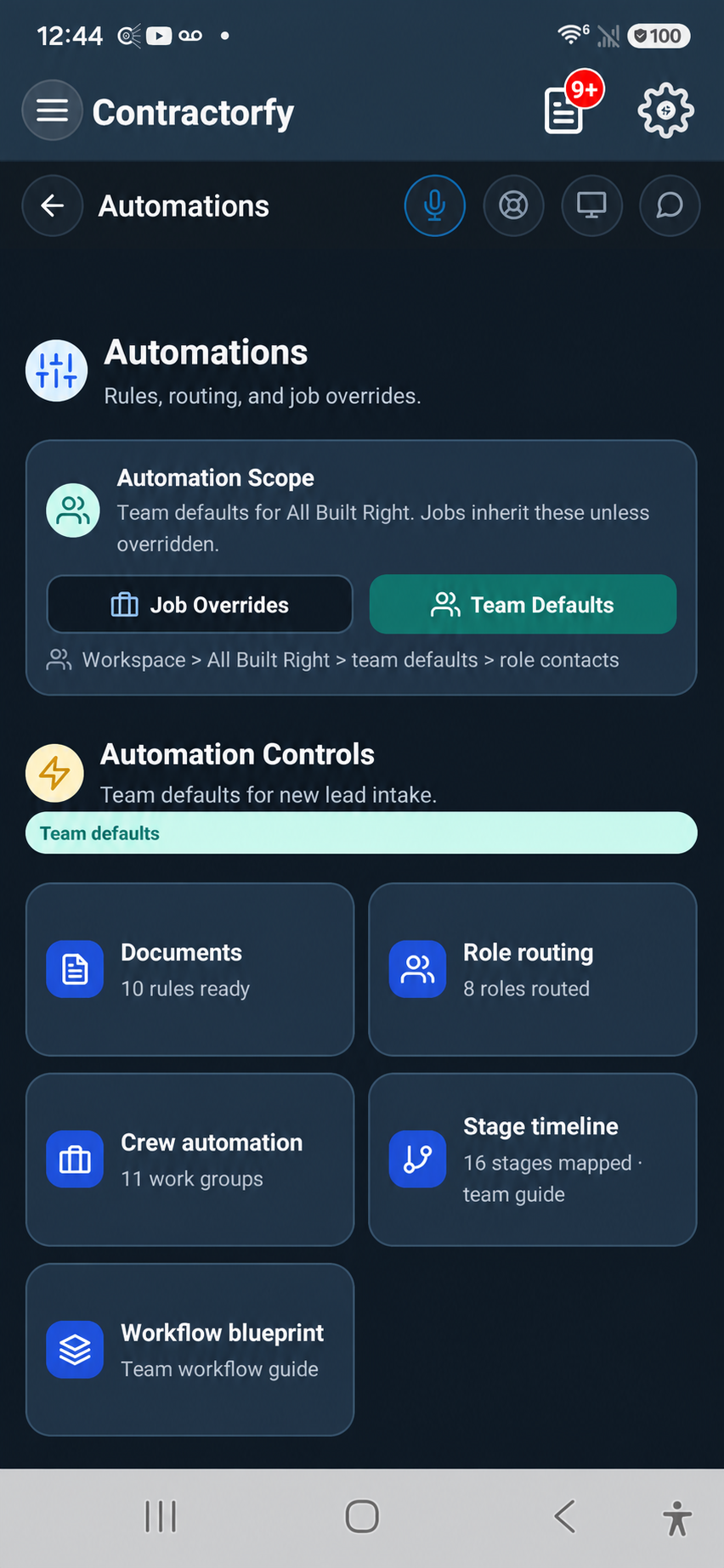
Roofing command center
The web workspace keeps roof details, documents, activity, and next actions together. Android app coming soon.
Proof point
Jobs, roof context, docs, and activity stay connected
Code-backed claim support
Contractorfy connects the carrier's line-item description and your job evidence to the most relevant building-code or manufacturer requirement. Potential code support is checked for direct relevance before it becomes a claim recommendation. Once approved, the section, clause, and source stay with that exact estimate, invoice, or supplement item so the adjuster can see why the work is required.
Proof point
Claim description → relevance-checked requirement → cited line item
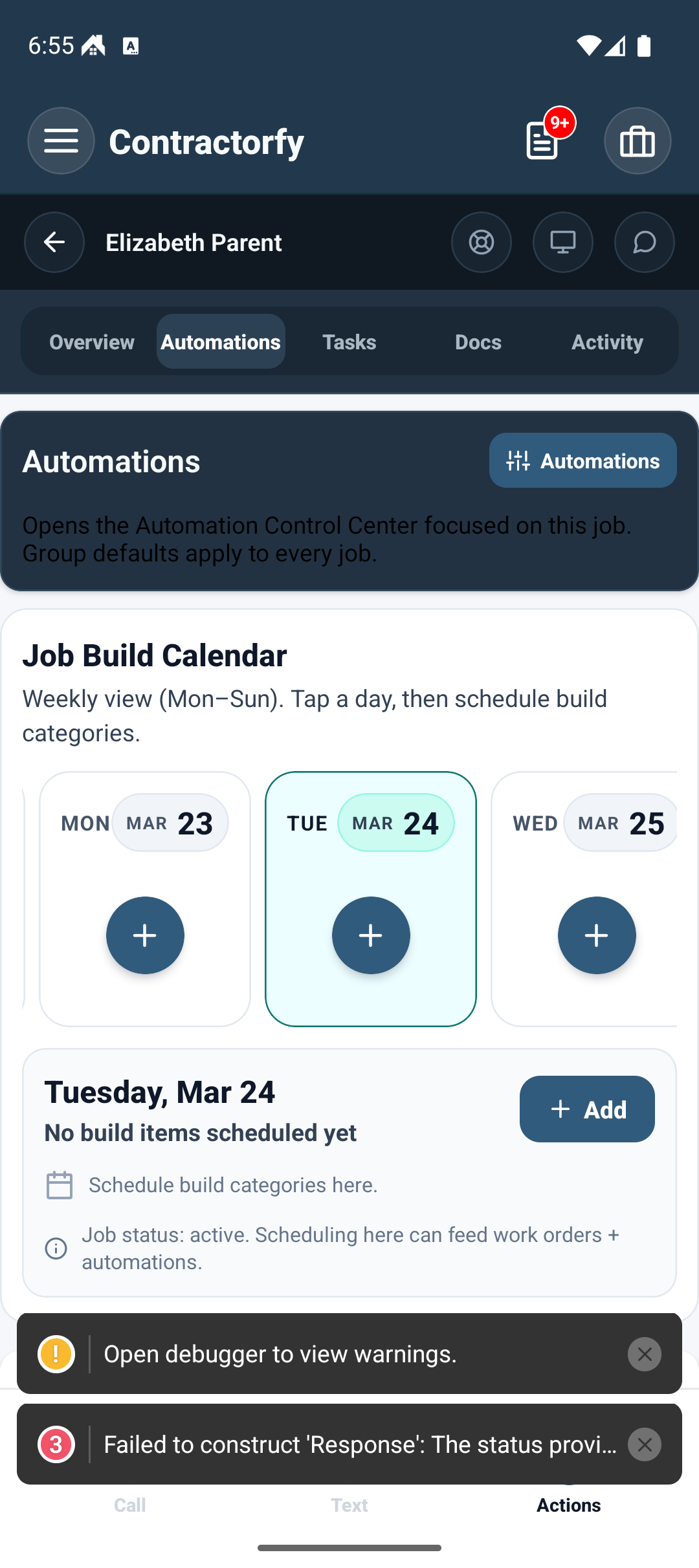
Connected workflow
Contractorfy links the messy pieces of roofing work into one operating rhythm: capture, analyze, generate, route, send, and follow up.
Proof point
Customer follow-up stays approved and trackable
Field-ready usability
Clear document previews and organized web review help crews and office staff move the job forward. Android app coming soon.
Proof point
Field crews and office staff share the same job story
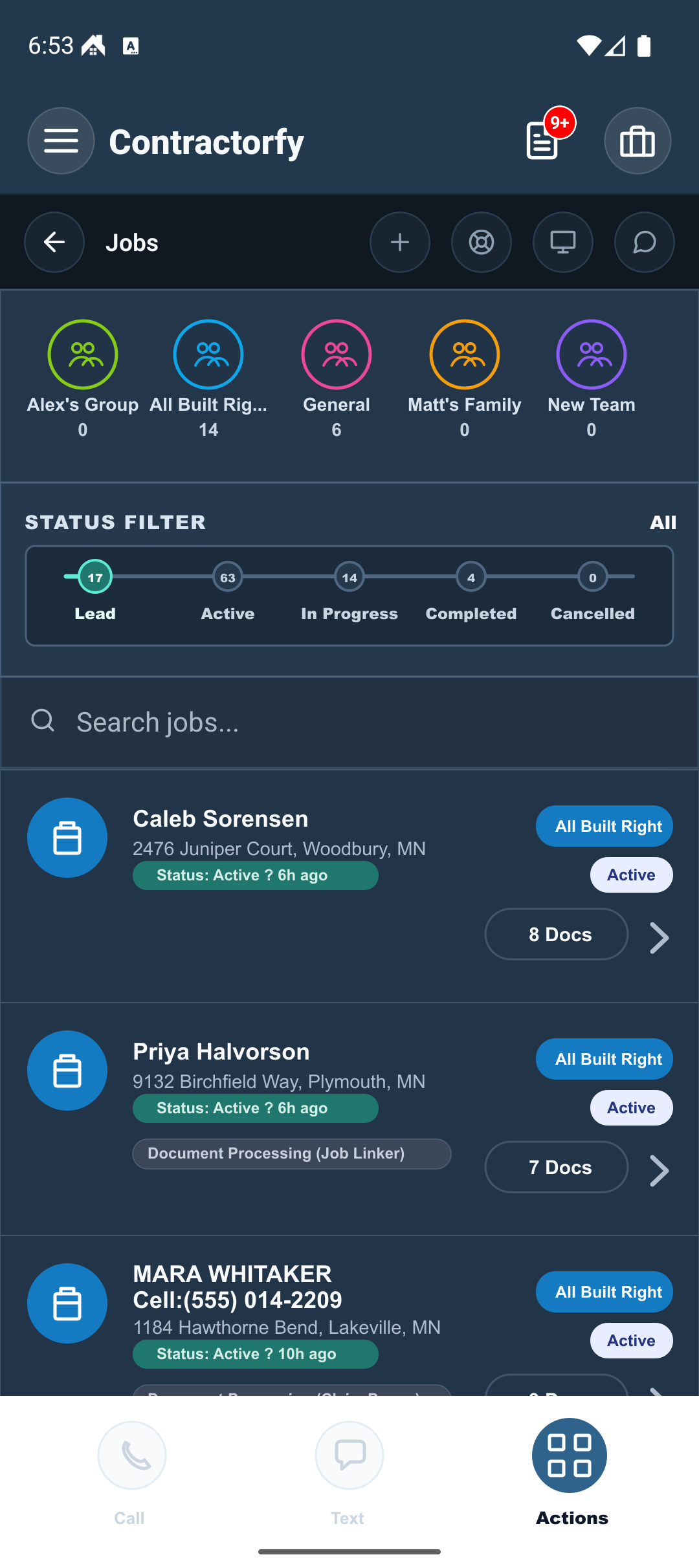
Jobsite proof
Roofing teams can review supplement estimates, material orders, hail reports, and lead intake sheets on the web. The Android board is a coming soon preview.
Proof point
Call capture produces production-ready documents
Roofing CRM modules
Contractorfy connects live calls, SMS, jobs, photos, documents, tasks, calendar, pricing, and approved delivery in one roofing CRM.
Proof point
Plans, workflows, and document controls are easy to evaluate
Roofing CRM features
The roofing CRM features teams compare before changing the office process.
Input
Calls + SMS
Recordings, transcripts, and field notes become action.
Output
40+ docs
Estimates, supplements, orders, reports, invoices, and documents.
Surface
Works in your browser
Field and office share the same job context.
Delivery
Governed
Documents move through review and approved send.
Roofing software comparison
Compare manual roofing office work, generic CRM storage, and Contractorfy call-to-document automation.
Call to document
1 call
Manual
Later
CRM
Manual
Contractorfy
1 call
A recorded roofing request can become job context, recommended document, and document draft in one workflow.
Roofing documents
40+
Manual
Folders
CRM
Uploads
Contractorfy
40+
Estimates, supplements, work orders, material orders, hail reports, lead intake sheets, and job-file documents.
Field workflow
Works in your browser
Manual
Texts
CRM
Web
Contractorfy
Works in your browser
Crews see mobile job details while the office reviews documents, pricing, routing, and delivery.
Customer delivery
Approved send
Manual
Memory
CRM
Varies
Contractorfy
Approved send
Generated documents route through the existing delivery pipeline with opt-in enforcement intact.
Roofing CRM features
Compare roofing call capture, generated documents, office review, and approved delivery across the workflows your team can automate first.
Workflow
Recommended
Roofing supplement estimates for denied, underpaid, and revised claims
Production
Multi-crew operators coordinating vendors and crews
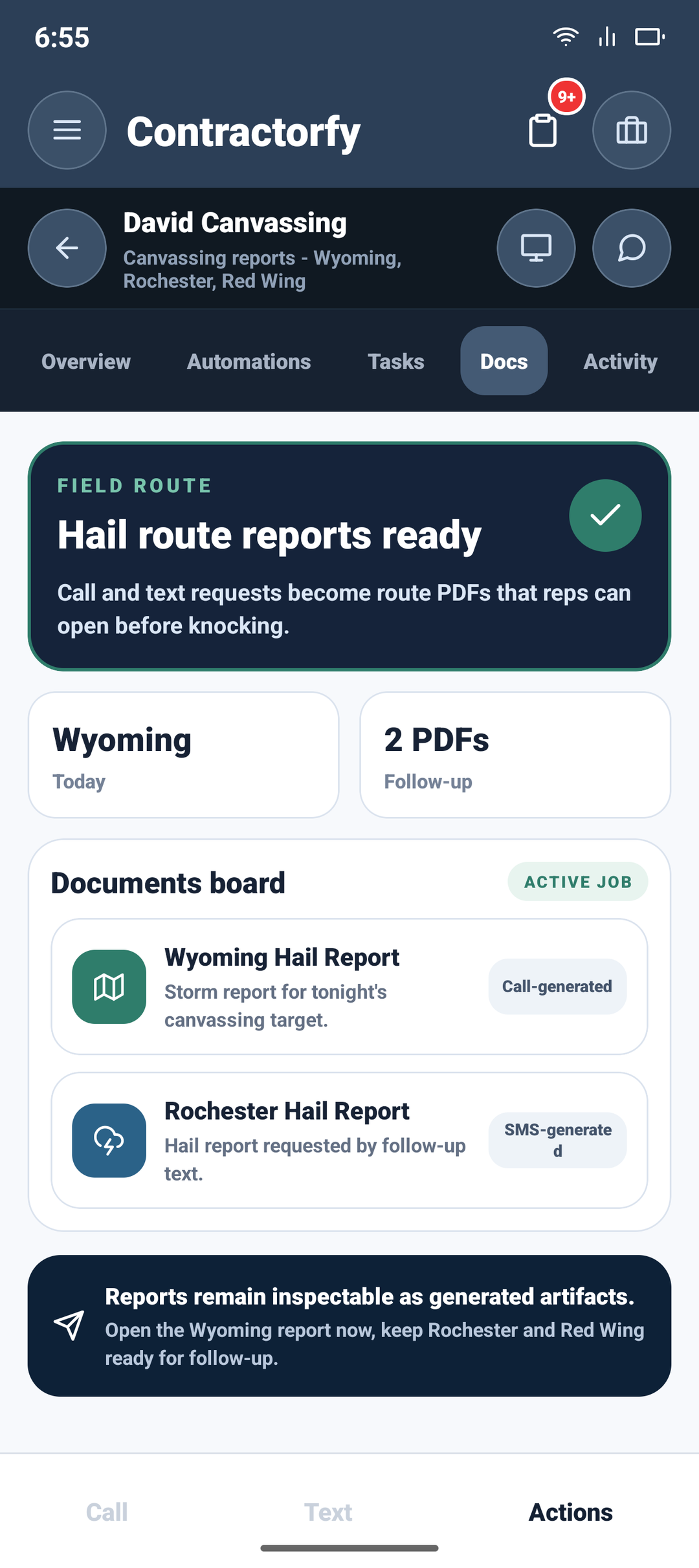
Storm
Storm teams that need fast neighborhood response
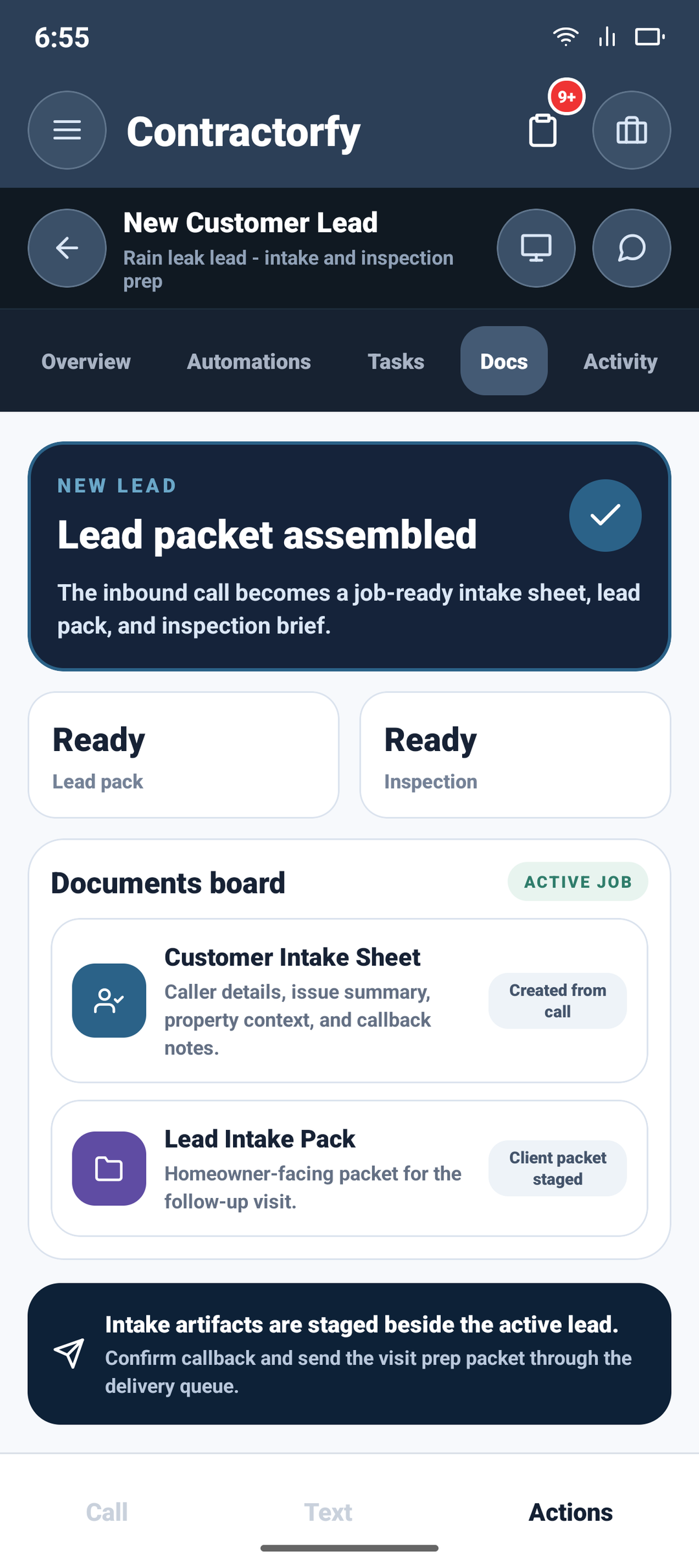
Sales
Roofing teams that need faster first response
Roofing automation packages
Pick supplement estimating, production handoff, sales intake, or storm routing and see the call inputs, generated documents, and team handoff.
Roofing CRM workflows
Compare the workflows roofing teams buy for: supplement estimates, production handoffs, new customer intake, and storm response.
Ultra
Best for supplements
Plus
Core
Can your CRM do that?
Android app (coming soon) preview: watch a caller request become an estimator response, generated document, and documents board.
Field-to-office workflow
Crews capture job context in the field while the office reviews calls, documents, and next actions from the same live record.
Call
Capture the call, read the transcript, coach the response, and start the document while the estimator is still in the conversation.
Field view
The rep can see the call, transcript, and next action while the conversation is still fresh.
Transcript: Caller context stays visible while the estimator responds.
Suggested response: Sales language is prepared from the live conversation.
Generated estimate: The estimate document appears inside the same call path.
Call
Recording first
Call audio, transcript, speaker context, and workflow action stay stacked in one field-ready view.
Suggested response
Estimator language is visible before the rep has to improvise from memory.
Recommended document
The generated document appears in the same operating path instead of a separate PDF chase.
Job
Property centered
The roof, address, claim context, and job timeline remain attached to the operating record.
Crew readable
Large mobile screens make status and next action easy to scan on site.
Office aligned
The same job context supports web review, pricing, documents, and routing.
Docs
Document visible
The generated document is a job asset, not a loose attachment.
Review ready
Office staff can inspect the output before delivery.
Send boundary
Customer delivery still runs through the approved send workflow and opt-in enforcement.
Built for field crews
Contractorfy keeps the most important call, job, and document actions large enough to use in the field without losing the office review path.

Operational durability
Call capture, generated documents, reviewer context, and approved delivery status stay attached when the work moves from estimator to production to customer follow-up.
Fewer handoffs
Replace phone notes, spreadsheet trackers, PDF folders, and separate CRM updates with one job file your team can inspect before anything is sent.
Workflow packages
Estimator desk
Production manager
Storm team
Performance
Contractorfy roofing CRM turns call intent into review-ready documents while customer-ready delivery stays governed by the existing send pipeline.
Customer-ready document delivery
Android app (coming soon) preview: call capture and job context feed the document. Office review and the delivery workflow keep the customer handoff clear.
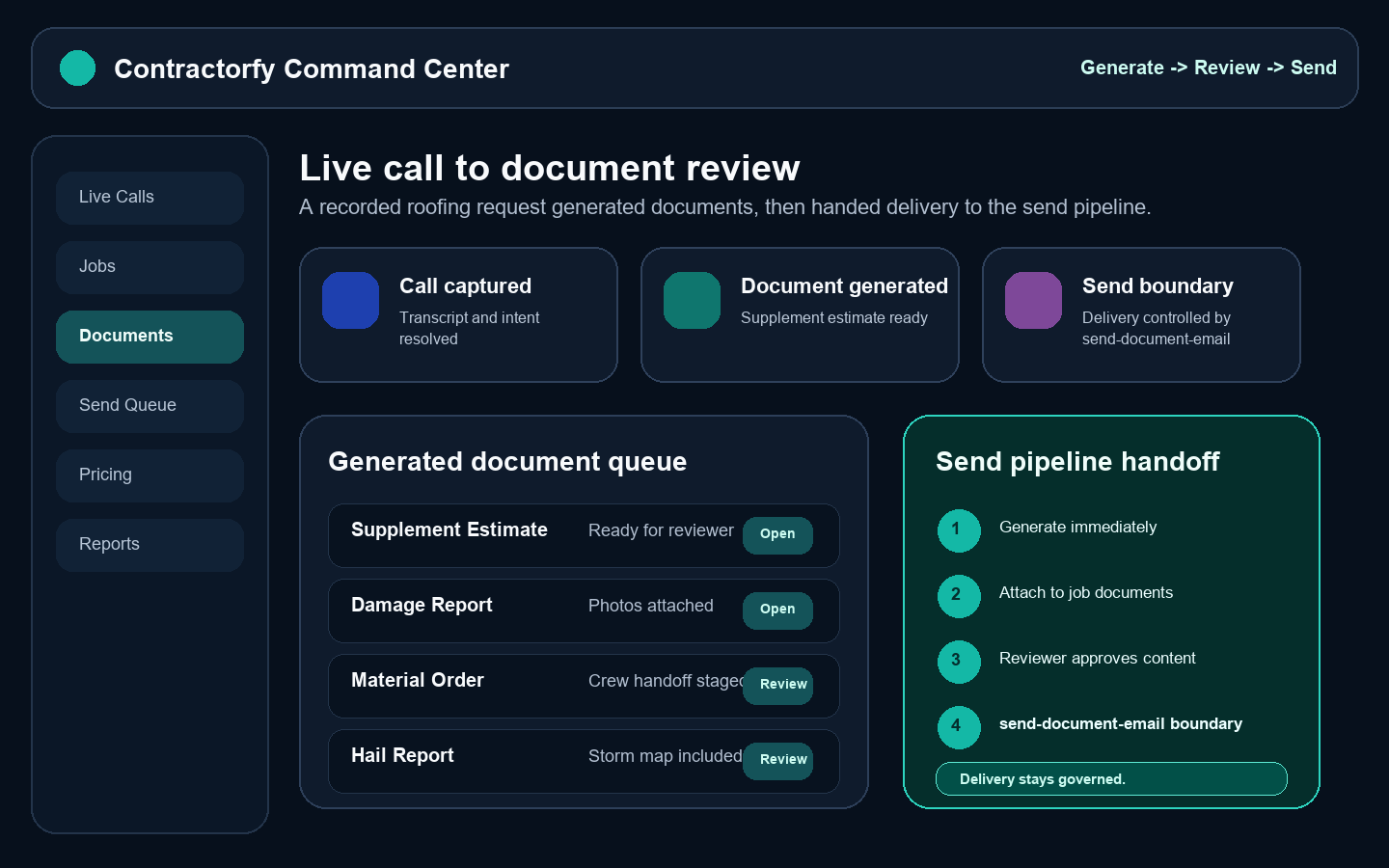
Intent captured
Document generated
Send governed
Approved delivery workflow
Generate now. Review next. Send through the controlled delivery workflow.
Live calls, SMS, photos, roof data, and claim context feed the estimate, supplement, work order, material order, hail report, or lead intake sheet.
Generated documents stay visible for office review while customer email and SMS delivery stay inside a controlled delivery workflow.
Jobs, reviewers, generated documents, and web queues stay organized when call volume spikes. Android field views coming soon.
Roofing workflow automation
The fast part is document generation. The durable part is keeping review, field context, and customer-ready delivery in the same controlled workflow.
Input
Live call, SMS, photo, roof data, and claim context
Output
Estimate, supplement, material order, work order, hail report, or lead intake sheet
Review
Office approval stays visible before customer-ready delivery
Boundary
Controlled delivery workflow remains the customer handoff authority
Field
Android capture coming soon; use the web office queue today
Scale
Storm-week calls become jobs, documents, tasks, and reviewers
Evidence capture
Guided job photos, measurements, damage notes, storm reports, and PDFs become one roofing evidence file your office can use.
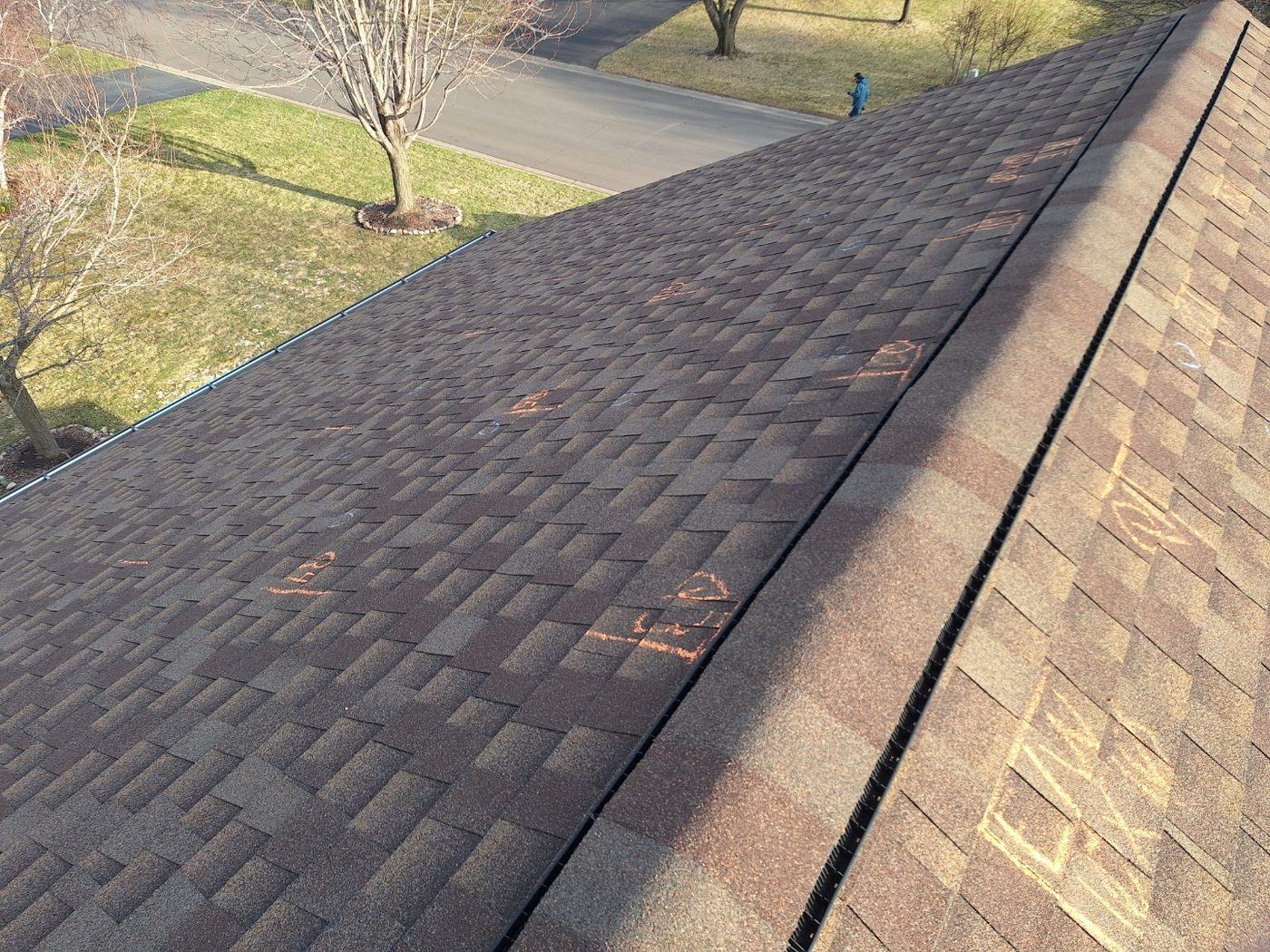
Guided capture
GPS matches the shot to the job on the spot. A live AI watches the viewfinder, calls out the test squares and close-ups adjusters ask for, and every photo uploads with its EXIF time and compass heading — then the damage report is staged for office review.
Shot on a real Contractorfy hail job
Camera assistant
Hail inspection
Assistant · voice
“Test squares look good. Get me a close-up of the circled hit on this slope before we run the report.”
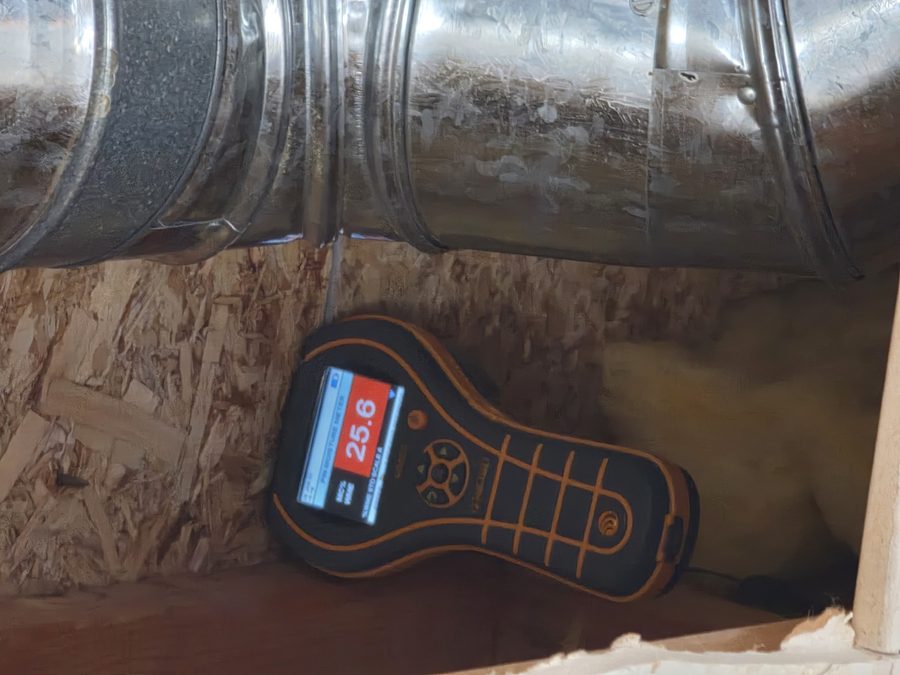
+9 photoson this job file
GPS job match
Photos attach to the right job — no picking
Auto-upload
EXIF time + compass heading saved
Hail report
Damage report staged for office review
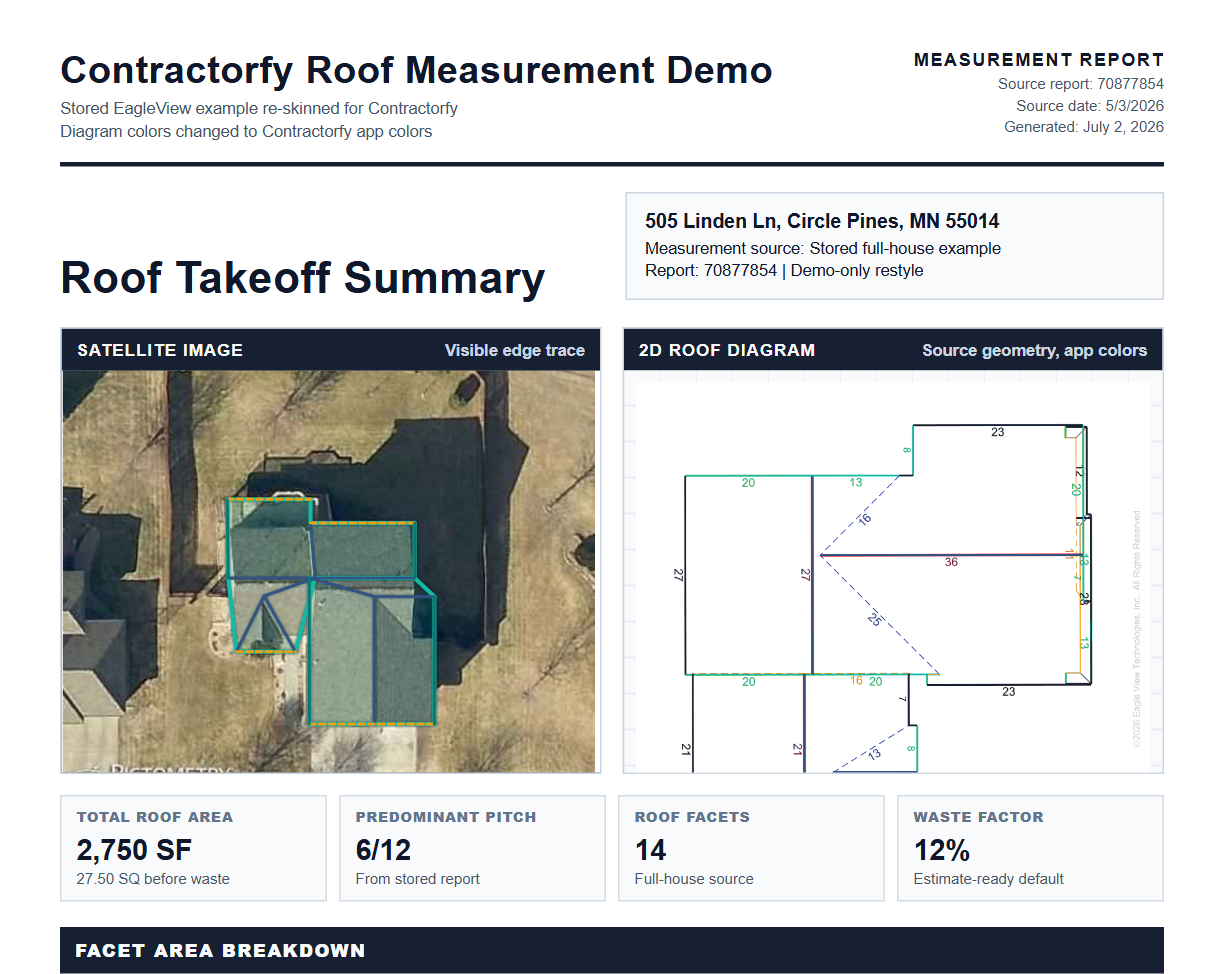
Zoom from roof photos and field notes into the measurement and claim context the office needs for a cleaner estimate.
Keep damage notes, storm context, and missing evidence prompts together when crews are documenting homes under pressure.
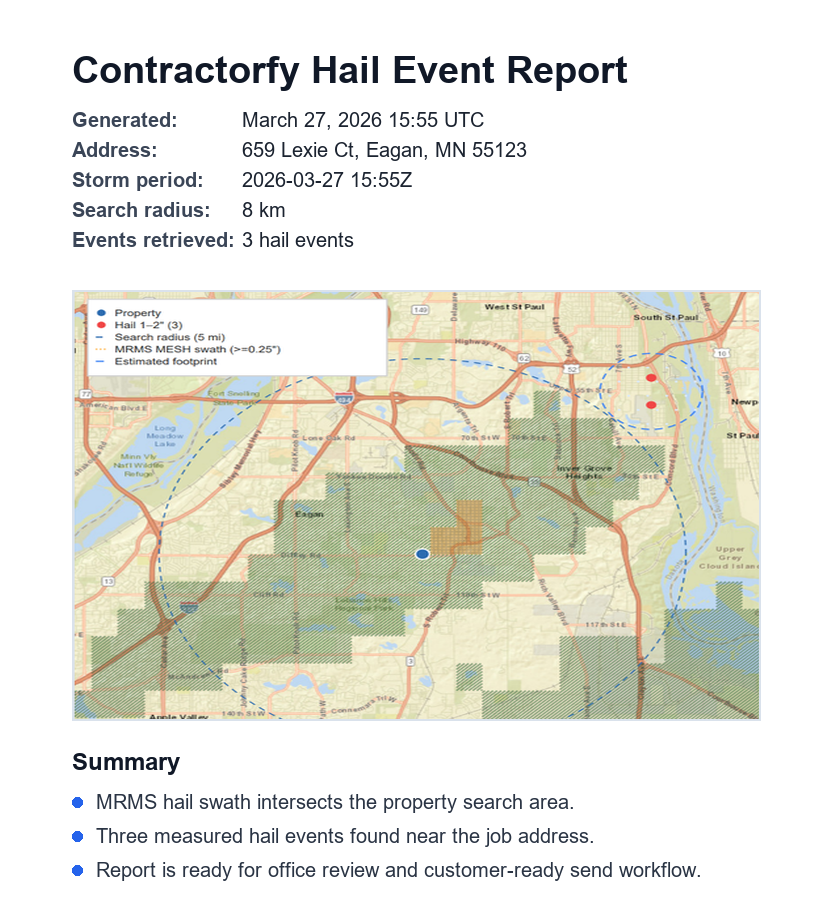
Storm date, city, and canvassing route turn into a field-ready PDF your team can review before customer delivery.

Field evidence layer
Review roof photos and generated documents in the web job record. Android capture is coming soon.
Office review layer
Pair the messy office context with generated Contractorfy documents so your team can see the problem and the finished document together.
Contractorfy AI
Live calls, field photos, storm context, and job history become suggested responses, generated documents, and next actions without bypassing office review.
Roofing AI call assistant
Suggested response
The assistant gives the estimator language while the customer is still on the call.
Automated next steps
Citation notes, reports, tasks, and document drafts can start from the call, text, photo, or job context.
AI business builder
Use Contractorfy AI to draft office assets, prepare review work, and keep roofing operations moving.
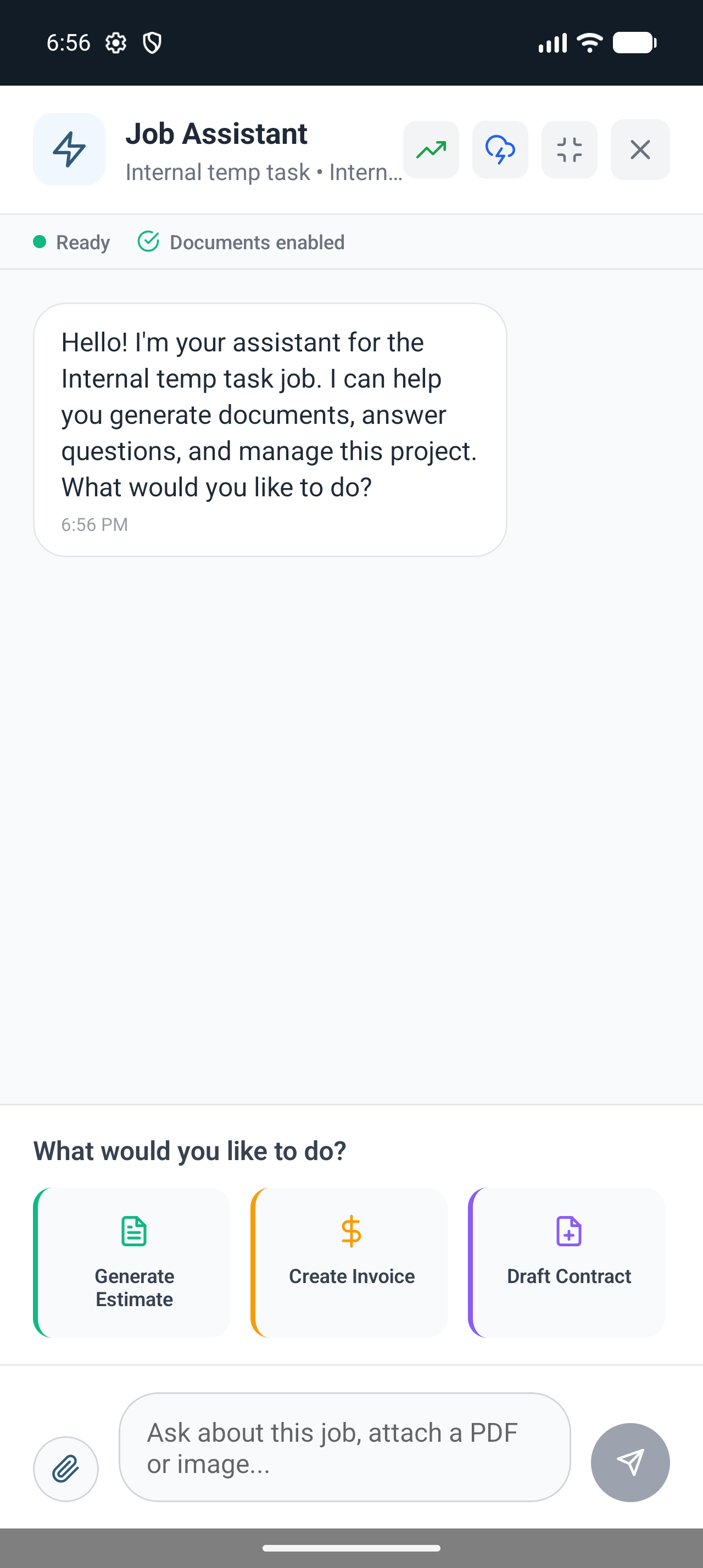
Live assistant
Build the supplement estimate. Keep delivery approved.
Seamless roofing actions
Ask, capture, generate, review, and route the next roofing action without losing the call, job, or document context.
Press. Talk. Document.
Contractorfy stages the estimator response, code citation notes, and supplement estimate.
Press. Talk. Document.
Now document
Material order and work order appear as job assets for office review.
Now document
Now route
Hail report, door-knocking PDF, and canvassing route are staged for the storm team.
Now route
Turns live call language into the right job action, recommended document, and follow-up path.
Builds estimate, supplement, work order, material order, hail report, or lead intake sheet drafts from context.
Keeps guided photos, damage notes, measurements, and missing evidence connected to the job.
Uses weather and job context to prepare hail report, canvassing, and neighborhood follow-up assets.
Lets AI-enabled offices extend workflows through marketplace skills without bypassing delivery rules.
Today's Contractorfy Brief
Morning
Review Juan supplement estimate and confirm code citation notes.
Afternoon
Capture missing left-slope photos before the damage report is sent.
Storm watch
Prepare hail report and canvassing route for the west neighborhood.
Delivery
Send approved document through the governed customer delivery workflow.
Now brief
Review document, finish missing photos, approve send.
Office review workflow
Use the web to review job documents and manage the send workflow today. Android field capture is coming soon.
Call captured. Job identified. Document generated.
The job record carries call details, generated documents, document status, and approval context before anything is sent.
Call
Capture the recording, transcript, response, and recommended document.
Work
Resolve customer intent into the right job and next action.
Docs
Generate the document and keep it tied to the job.
Route
Move approved delivery through the send workflow or hand off crew work.
Same job record
Review and approve documents on the web today. Android app coming soon.
Roofing document automation
Review jobs and documents on the web today. Android call capture is shown as a coming soon preview.
Field + office proof
See how call context becomes roofing estimates, claim review documents, inspection reports, and office-reviewed documents.
1 call
call to draft
Capture the request and start the roofing estimate or claim document.
40+
document types
Roofing estimates, supplements, material orders, inspection reports, and documents.
Web today
field + office
Review and approve documents on the web today. Android app coming soon.
Popular roofing workflows
Roofing contractor software for workflow automation, claim intake, inspection reports, job documents, crew scheduling, and approved document sends.
Roofing supplement estimates for denied, underpaid, and revised claims
Multi-crew operators coordinating vendors and crews
Storm teams that need fast neighborhood response
Roofing teams that need faster first response
Recommended
Production
Storm
Sales
Who it is built for
Contractorfy supports the business cases where calls, evidence, estimates, supplement estimates, material orders, and approved sends cannot live in separate tools.
Business problem
Storm weeks create more calls, inspections, and claim follow-up than the office can track manually.
What Contractorfy creates
Hail reports, canvassing routes, inspection briefs, and claim review documents stay tied to each property.
Roofing document proof
Storm route document
Business problem
Carrier responses, supplement notes, photo evidence, and code citations get separated across threads.
What Contractorfy creates
Claim context, supplement documentation, and evidence documents stay organized for review.
Roofing document proof
Supplement estimate
Business problem
Crews need job details in the field while the office manages pricing, tasks, and approved sends.
What Contractorfy creates
Crews and office staff can review work orders, material orders, and customer documents on the web. Android app coming soon.
Roofing document proof
Production handoff
Business problem
Generic AI tools miss your roofing workflow, customer rules, document review, and office approvals.
What Contractorfy creates
OpenClaw lets teams extend approved workflows without bypassing opt-in or send rules.
Roofing document proof
Governed AI route
Compare your workflow
See where calls, job context, generated documents, and handoff usually break apart, then choose the Contractorfy workflow that closes the gap first.
Contractorfy command center
1 workflow
Android app (coming soon) preview: live call capture, supplement estimate, job file, crew task, and approved send stay together.
Generic roofing CRM
manual docs
Customer records exist, but supplement documentation, crew dispatch, and customer follow-up still get rebuilt by hand.
Manual office stack
scattered
Phone notes, spreadsheets, PDF folders, and text threads split the estimate document from the job intake.
Contractorfy ecosystem

Web workspace + documents
Use the web workspace for supplement documentation, pricing, approvals, and customer delivery. Android field capture is coming soon.
Android app (coming soon)
Preview calls, photos, documents, jobs, and field context
Web office
Review, pricing, routing, documents, and operations
Document generator
Roofing documents built from real call and job context
Send workflow
Approved email/SMS delivery with opt-in boundaries
OpenClaw skills
Marketplace and BYO assistant workflows
API keys
Scoped external access for contractors and integrations
Weather watch
Storm context, hail reports, and canvassing routes
Why switch to Contractorfy
Start with the demo, bring over job context, and hand off documents without losing the customer or claim story.
Android app (coming soon) preview: watch a supplement request become a transcript, response, line-item document workflow, and document card.
Bring claim notes, roof measurements, job photos, carrier context, and existing PDFs into one contractor CRM job file.
Route estimates, material orders, hail reports, closeout docs, and customer follow-up to the right reviewer.
Why teams switch
Compare manual office work, generic roofing CRM tools, and Contractorfy roofing workflow automation.
Alternative
Phone notes, spreadsheets, PDF folders, and disconnected claim context leave the next person rebuilding what already happened.
Alternative
Most CRMs store the customer. Contractorfy turns a live roofing conversation into the documents your office needs to move money.
Recommended
Capture the request, resolve the job, generate the document, and route the next action through the approved workflow.
Capability
Capability
Capability
Capability
Capability
Privacy and trust
Contractorfy keeps customer approvals, document review, and team permissions separated so generated work still moves through trusted office rules.
Controlled access
AI can prepare the document, but people still own the accounts, customer permissions, review, and final delivery.
Accounts
User-owned
Approvals
Human set
Delivery
Verified
Trust status
Owned connections
Each user keeps control of the accounts tied to their roofing office.
Right team only
Crew, estimator, and office actions stay assigned to the right company context.
Approvals intact
AI helpers cannot turn on customer communication permissions by themselves.
Verified delivery
Customer documents move through review before anything leaves the office.
Confidence check
The document can be generated now, but customer communication stays inside verified delivery.
AI helpers cannot turn on customer communication permissions by themselves.
Customer documents move through review before anything leaves the office.
API keys and assistants stay inside the permissions the company gives them.
Security proof
Contractorfy gives roofing teams AI speed without turning customer records, company access, or document delivery into an open lane.
Verified, limited, auditable
Generate documents from real call and job context, then keep reach limited, review visible, and delivery verified.
Verified
Access-limited
Auditable
Protection status
Verified
Every document has a review step.
Customer-ready documents stay visible before delivery.
Limited
Assistants stay inside approved reach.
OpenClaw, API keys, and tools stay permission-aware.
Auditable
The job keeps the record.
Calls, generated documents, review, and delivery status stay attached.
For owners
Company access stays company-owned.
For teams
The right people see the right job context.
Find your Contractorfy
Pick the first revenue workflow: supplements, production handoff, storm response, or new customer intake.
Supplement team
Generate supplement estimates, code citation notes, claim review documents, and reviewer handoff from the recorded claim call.
Production team
Turn field measurements into crew dispatch, EPDM material order, vendor scope, and work order document.
Storm team
Build storm job intake, hail report PDFs, door-knocking targets, and canvassing follow-up from weather context.
Sales team
Create the lead intake sheet, inspection brief, customer callback task, and sales pipeline entry from the first call.
Contractorfy web command center
Use the web command center for pricing, supplement documentation, approvals, crew management, sales pipeline work, and customer delivery. Android app coming soon.
Discover the benefits
Implementation, delivery, and office control stay connected to the call, job, document, and send path.
Setup path
01
Start from the call-to-supplement flow, then select the estimator, production, storm, or intake workflow already running in your office.
Real call path selected before automation expands
Delivery protection
02
Generated documents route through review and approved send rules instead of giving AI a shortcut around customer opt-ins.
Approved customer delivery stays trackable
Office control
03
Keep the generated document attached to the job file, reviewer, and send path so the office can inspect or pause the handoff.
Job file keeps document, reviewer, and send status together
Live product evidence
Inspect live call capture, estimator documents, mobile document views, and office handoff so your team can see where Contractorfy pays for itself.
Rating snapshot
Roofing teams use Contractorfy to stop retyping calls, keep claim context attached, and turn job conversations into documents.
Estimator proof
Live call capture keeps the transcript, suggested response, recommended document, and generated document together.
Office proof
Documents land where the team can review them: estimates, supplements, material orders, hail reports, and job documents.
How-to videos
Watch call to estimate, storm SMS to hail report, production call to order, and new customer to lead intake sheet.
Watch a recorded roofing call become an estimate document with document proof.
See a town decision and follow-up text become a hail report and canvassing route.
Turn field context into a material order and work order for the crew.
Capture intake, job context, lead intake sheet, and inspection brief from the first call.
Pricing
Start with a free trial, then upgrade when call-to-document automation proves its value in your roofing office.
Starter
$29
per month
Owner-operators who need roofing jobs, calls, tasks, and documents in one place.
Professional
$79
per month
Roofing teams that need automation, shared groups, and higher AI limits.
Enterprise
$249
per month
Multi-location roofing operations coordinating groups and teams.
Roofing software workflows
Products
Comparisons
Guides
Contractorfy FAQ
Compare web workflows, document generation, AI controls, delivery rules, and pricing. Android app previews show what is coming soon.
Contractorfy can generate estimates, supplements, work orders, material orders, hail reports, customer documents, inspection briefs, and job-file documents from call, SMS, and job context.
Yes. These are previews of the Android app, which is coming soon. Use Contractorfy on the web today.
No. Contractorfy generates the document from the call or job context, then routes it through approved delivery where opt-in rules are enforced.
Yes. Crews and office staff can use the web app for jobs, documents, review, routing, and business operations. Android app coming soon.
Contractorfy can replace the call-to-document part of the office stack by connecting live call capture, job intake, supplement documentation, production documents, tasks, and approved delivery in one roofing CRM workflow.
The Android app is coming soon and is not available to download yet. Crews, estimators, and office staff can use Contractorfy in their browser today.
A recorded supplement request can create transcript context, suggested estimator language, line-item supplement estimates, code citation notes, claim review documents, and an office review path.
Contractorfy supports roofing estimates, supplement estimates, material orders, work orders, hail reports, inspection briefs, lead intake sheets, invoices, damage reports, measurement reports, and job-file documents.
Start with the interactive demos and the free ChatGPT sign-up path. The best first rollout is usually one money workflow: supplement desk, production handoff, storm route, or sales intake.

Start the workflow
Start free with ChatGPT, watch the live call demo, then choose the plan once the call-to-document workflow is worth keeping.
Every call and text, on repeat
Live call
Customer text
Supplement estimateMaterial orderHail reportLead intake sheet
Built while you talked
No retyping. Calls and texts build their own paperwork, then wait for office approval before anything is sent.